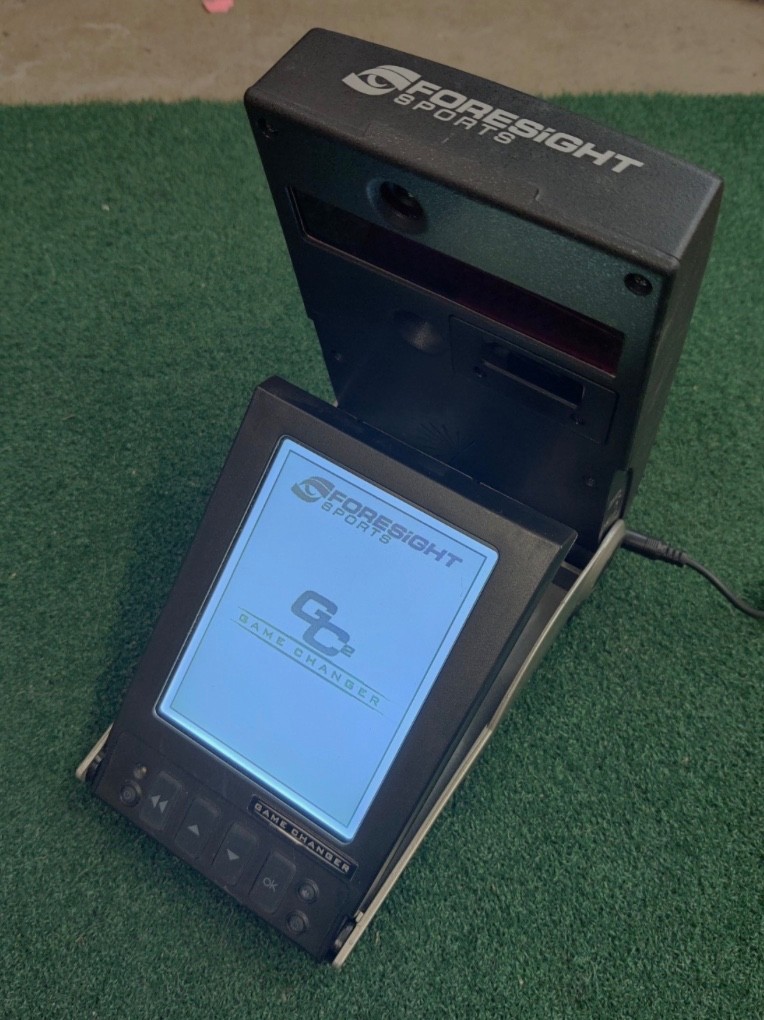

Photos from current listings. Actual item, color, and included accessories may vary.
Foresight Sports GC2 Buying Guide
The Foresight Sports GC2 is a camera-based indoor golf launch monitor that measures ball speed, launch angle, and spin to produce tour-level accuracy without ceiling-mounted radar. Its primary trade-off is that the head unit is only half the system: you must pair it with Foresight's licensed simulation software and a capable PC, and the older GC2 lacks the Wi-Fi and onboard battery of the GCQuad. Buy the GC2 only if you can confirm an active software license transfers with the unit; otherwise budget for the full FSX/RX licensing tier as part of your decision.


At a glance
- Brand
- Not synced yet
- Model
- Not synced yet
- MPN
- Not synced yet
- Category
- Golf Rangefinders & Launch Monitors
- Status
- Offers available
- Data updated
- Nov 16, 2026
Current offers
Highlights
- Dual high-speed camera architecture measures ball speed, launch angle, azimuth, and spin directly at the ball, with no Doppler radar interference from HVAC or ceiling height.
- GC2 requires a wired USB connection to a Windows PC and Foresight FSX or RX simulation software; the license dongle/account is the critical transferable asset, not the camera unit.
- Physically smaller and older than the GCQuad, the GC2 uses the same camera-measurement principle but lacks quad-camera clubhead data, onboard display, Wi-Fi, and internal battery.
- Foresight software tiers gate which data parameters and courses are unlocked; a GC2 with a basic range license will not display full simulation without an FSX license upgrade.
Best use cases
- Best fit: indoor home simulator builders with a dedicated gaming PC, projector, and impact screen who want camera-accurate ball flight and can absorb FSX/RX software licensing.
- Best fit: commercial coaching studios needing reliable ball-data measurement in tight bays where radar would be obstructed by walls or ceilings.
- Wrong fit: outdoor range users wanting standalone yardage readouts—the GC2 is a tethered PC peripheral, not a handheld rangefinder.
- Skip it: buyers who need clubhead speed, smash factor, and path data out of the box—those require GCQuad-class quad-camera hardware, not the GC2.
Buying tips
- Confirm the included software license tier (FSX, FSX Play, or RX range) and whether the license transfers to your Foresight account before paying; the dongle alone is not the license.
- Verify the unit includes the USB cable, power adapter, and flash backup media; GC2 units sold as 'software and license' bundles often omit the original carrying case.
- Match your PC to FSX requirements: a dedicated GPU (GTX 1060-class or better) and Windows 10/11 are the practical floor for smooth simulation rendering.
- Inspect the camera lens and flash window for scratches or haze; camera-based units degrade in accuracy if the optical path is compromised, and calibration service is costly.
Specs
| Measurement Tech | Dual high-speed camera |
|---|---|
| Data Measured | Ball speed, launch, spin, azimuth |
| Connectivity | USB to Windows PC |
| Software Requirement | Foresight FSX / RX license |
Related searches
What to check before buying
- Measure your bay: the GC2 sits roughly 8–10 feet from the ball and needs a clear line of sight to the hitting zone with no ceiling obstruction for the flash.
- Confirm a Windows PC with a discrete GPU and at least one free USB-A port within cable reach of the unit's placement.
- Check that your projector and impact screen are sized for the 4:3 or 16:9 aspect ratio your FSX software outputs.
- Verify the seller provides the Foresight account login or license transfer documentation, not just the physical flash drive.
FAQ
Data sources: eBay / Amazon listings and product attribute feeds Data updated Nov 16, 2026.
Some links on this page are affiliate links. If you buy after clicking one, we may earn a commission at no extra cost to you. This does not change which products appear here or their order. Affiliate disclosure.